准备:Elasticsearch+Kibana+Filebeat实现监控mysql与nginx日志
版本均采用6.8.18 下载链接
Elasticsearch
修改系统单进程打开文件数,创建elk用户,7.X版本后只能用非root用户。
修改elasticsearch.yml
 1
 2
 3
 4
 5
 6
 7
 8
 9
10
11
12
13
14
15
16
17
18
19
20
21
22
23
24
| [root@100 elasticsearch-6.8.18]# egrep -Ev '^#' config/elasticsearch.yml
path.data: /var/data/es/es-node/ #数据存放路径
path.logs: /var/log/es/es-node/ #日志存放
network.host: 0.0.0.0
#启动项目
./bin/elasticsearch -d -p pid
[root@100 elasticsearch-6.8.18]# curl localhost:9200
{
"name" : "node-1",
"cluster_name" : "my-application",
"cluster_uuid" : "Kv3SHXAoS4u5GyOe0uFc1Q",
"version" : {
"number" : "6.8.18",
"build_flavor" : "default",
"build_type" : "tar",
"build_hash" : "aca2329",
"build_date" : "2021-07-28T16:06:05.232873Z",
"build_snapshot" : false,
"lucene_version" : "7.7.3",
"minimum_wire_compatibility_version" : "5.6.0",
"minimum_index_compatibility_version" : "5.0.0"
},
"tagline" : "You Know, for Search"
}
|
Kibana
1
2
3
4
5
| [root@100 kibana-6.8.18]# egrep -Ev '^#|^$' config/kibana.yml
server.port: 5601
server.host: "0.0.0.0"
elasticsearch.hosts: ["http://localhost:9200"]
kibana.index: ".kibana"
|
Filebeat
数据采集这里使用filebeat
 1
 2
 3
 4
 5
 6
 7
 8
 9
10
11
12
13
14
15
16
17
18
19
| [root@100 filebeat-6.8.18]# egrep -Ev '^#|^$|#' f.yml
filebeat.inputs:
- type: log
enabled: false
paths:
- /var/log/*.log
filebeat.config.modules:
path: ${path.config}/modules.d/*.yml
reload.enabled: true
setup.template.settings:
index.number_of_shards: 3
setup.kibana:
host: "localhost:5601"
output.elasticsearch:
hosts: ["localhost:9200"]
protocol: "http"
processors:
- add_host_metadata: ~
- add_cloud_metadata: ~
|
这里采用启动模块的方式来配置采集的文件,这里用nginx,mysql
 1
 2
 3
 4
 5
 6
 7
 8
 9
10
11
12
13
14
15
16
17
18
19
20
21
22
23
24
| bash-4.2$ ./filebeat modules enable mysql nginx #开启nginx mysql模块
Module mysql is already enabled
Module nginx is already enabled
bash-4.2$ ls modules.d/ #可以看到nginx 与 mysql配置文件已经变了
apache2.yml.disabled iis.yml.disabled mongodb.yml.disabled redis.yml.disabled
auditd.yml.disabled iptables.yml.disabled mysql.yml suricata.yml.disabled
elasticsearch.yml.disabled kafka.yml.disabled nginx.yml system.yml.disabled
haproxy.yml.disabled kibana.yml.disabled osquery.yml.disabled traefik.yml.disabled
icinga.yml.disabled logstash.yml.disabled postgresql.yml.disabled
bash-4.2$ egrep -Ev '^#|#|^$' modules.d/mysql.yml
- module: mysql
error:
enabled: true
var.paths: ["/var/log/mysqld.log"]
slowlog:
enabled: true
bash-4.2$ egrep -Ev '^#|#|^$' modules.d/nginx.yml
- module: nginx
access:
enabled: true
var.paths: ["/usr/local/nginx/logs/access.log"]
error:
enabled: true
var.paths: ["/usr/local/nginx/logs/error.log"]
|
测试启动
1
2
3
4
5
6
7
8
9
| ./filebeat test config -e -c ./f.yml
.........
2021-11-11T14:56:14.833+0800 INFO instance/beat.go:280 Setup Beat: filebeat; Version: 6.8.18
2021-11-11T14:56:14.834+0800 INFO elasticsearch/client.go:164 Elasticsearch url: http://localhost:9200
2021-11-11T14:56:14.835+0800 INFO [publisher] pipeline/module.go:110 Beat name: 100
Config OK
#测试启动
bash-4.2$ ./filebeat -e -c ./f.yml
可以看到没有报错信息,可以转到后台启动,如果有报错,检查配置文件。
|
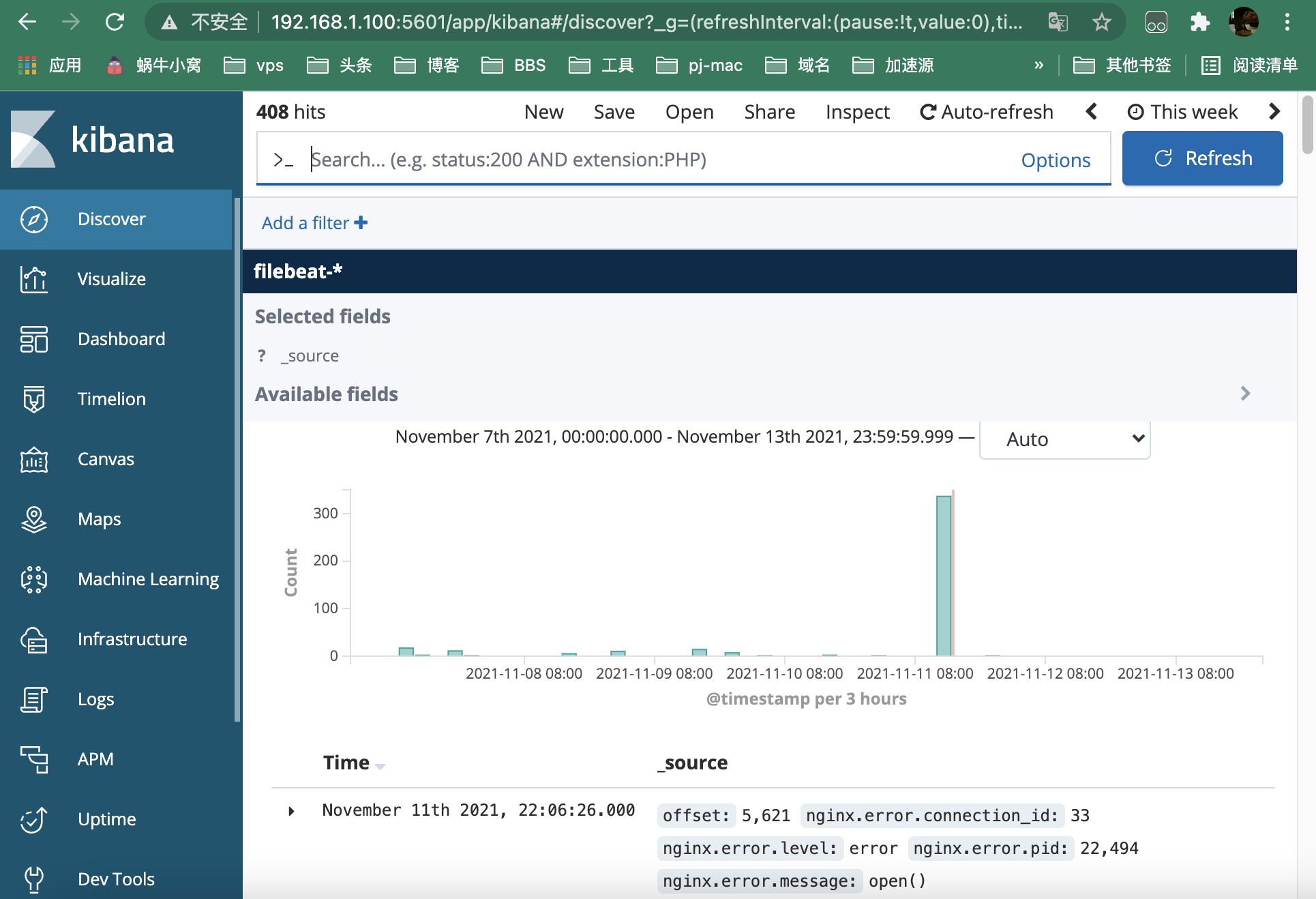
日志查看
可以看到mysql和nginx的日志都在这里