由于安装mysql空间不足
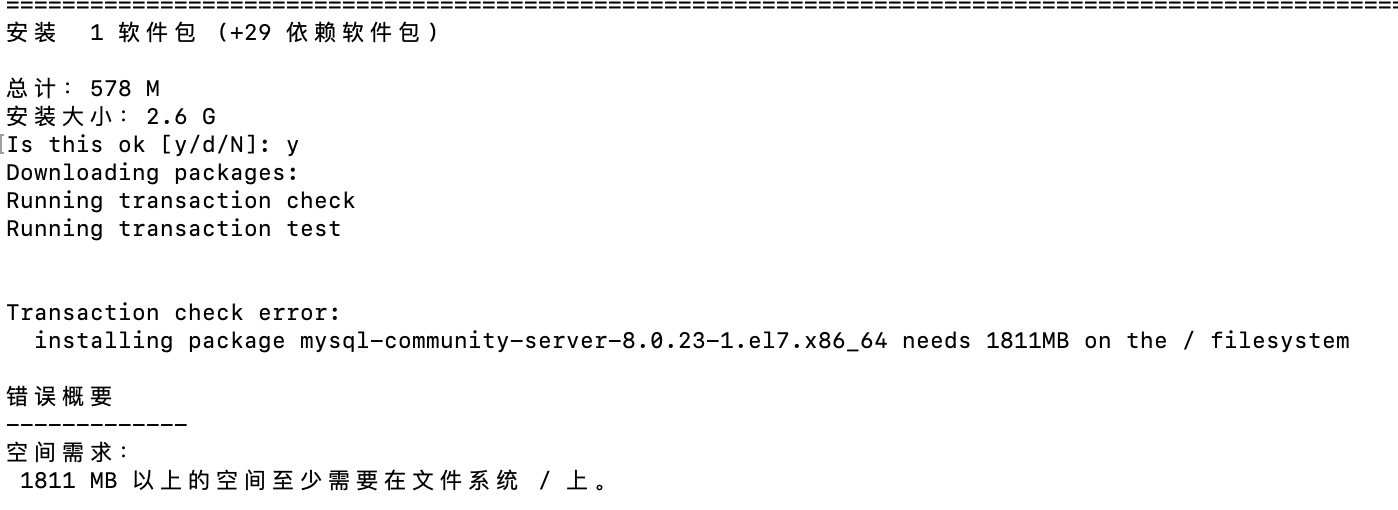
准备
于是给根目录扩展一下,在后台esxi给虚拟机添加一块新的硬盘
查看一下硬盘信息
 1
 2
 3
 4
 5
 6
 7
 8
 9
10
11
12
13
14
15
16
17
18
19
20
21
22
23
24
25
26
27
28
29
30
31
32
33
| [root@102 ~]# fdisk -l
磁盘 /dev/sda:5368 MB, 5368709120 字节,10485760 个扇区
Units = 扇区 of 1 * 512 = 512 bytes
扇区大小(逻辑/物理):512 字节 / 512 字节
I/O 大小(最小/最佳):512 字节 / 512 字节
磁盘标签类型:dos
磁盘标识符:0x000ddd4e
设备 Boot Start End Blocks Id System
/dev/sda1 * 2048 2099199 1048576 83 Linux
/dev/sda2 2099200 10485759 4193280 8e Linux LVM
磁盘 /dev/sdb:21.5 GB, 21474836480 字节,41943040 个扇区
Units = 扇区 of 1 * 512 = 512 bytes
扇区大小(逻辑/物理):512 字节 / 512 字节
I/O 大小(最小/最佳):512 字节 / 512 字节
磁盘标签类型:dos
磁盘标识符:0x87b32e1c
设备 Boot Start End Blocks Id System
/dev/sdb1 2048 41943039 20970496 83 Linux
磁盘 /dev/mapper/centos-root:24.7 GB, 24696061952 字节,48234496 个扇区
Units = 扇区 of 1 * 512 = 512 bytes
扇区大小(逻辑/物理):512 字节 / 512 字节
I/O 大小(最小/最佳):512 字节 / 512 字节
磁盘 /dev/mapper/centos-swap:536 MB, 536870912 字节,1048576 个扇区
Units = 扇区 of 1 * 512 = 512 bytes
扇区大小(逻辑/物理):512 字节 / 512 字节
I/O 大小(最小/最佳):512 字节 / 512 字节
|
对新添加的/dev/sdb进行分区
fdisk /dev/sdb
分出来上图/dev/sdb1
扩展
查看当前卷分组名
vgdisplay -v
 1
 2
 3
 4
 5
 6
 7
 8
 9
10
11
12
13
14
15
16
| --- Logical volume ---
LV Path /dev/centos/root
LV Name root
VG Name centos
LV UUID ugxksD-p8De-7yuh-OAtT-aHQo-wwrs-J5uOxO
LV Write Access read/write
LV Creation host, time localhost.localdomain, 2021-01-31 14:25:09 +0800
LV Status available
# open 1
LV Size 23.00 GiB
Current LE 5888
Segments 2
Allocation inherit
Read ahead sectors auto
- currently set to 8192
Block device 253:0
|
创建pv
1
| [root@102 ~]# pvcreate /dev/sdb1
|
查看pv
1
2
3
4
| [root@102 ~]# pvs
PV VG Fmt Attr PSize PFree
/dev/sda2 centos lvm2 a-- <4.00g 0
/dev/sdb1 centos lvm2 a-- <20.00g 504.00m
|
扩展
1
| [root@102 ~]# vgextend centos /dev/sdb1
|
查看
1
2
3
4
| [root@102 ~]# lvs
LV VG Attr LSize Pool Origin Data% Meta% Move Log Cpy%Sync Convert
root centos -wi-ao---- 23.00g
swap centos -wi-ao---- 512.00m
|
扩展逻辑卷
1
2
| [root@102 ~]# lvextend -L +18G /dev/centos/root
[root@102 ~]# xfs_growfs /dev/centos/root
|
1
2
3
4
5
6
7
8
9
| [root@102 ~]# df -h
文件系统 容量 已用 可用 已用% 挂载点
devtmpfs 485M 0 485M 0% /dev
tmpfs 496M 0 496M 0% /dev/shm
tmpfs 496M 7.1M 489M 2% /run
tmpfs 496M 0 496M 0% /sys/fs/cgroup
/dev/mapper/centos-root 23G 4.8G 19G 21% /
/dev/sda1 1014M 212M 803M 21% /boot
tmpfs 100M 0 100M 0% /run/user/0
|