k8sgpt运用实践
一、k8sgpt是什么

k8sgpt目前已经作为云原生计算基金会(CNCF)的一部分,为 Kubernetes 云原生软件工程师 (SRE) 赋予了超能力。 提供了一种简单高效的方式来扫描 Kubernetes 集群并以简单的英文句子诊断集群、节点、Pod 的相关问题。 该工具旨在将工程师们的经验编码到其分析器中,从而帮助提取最相关的信息,并通过人工智能丰富了各种诊断和分析场景。
K8sGPT
二、k8sgpt配置
2.1、安装
k8sgpt采用Go语言编写,可以在多种操作系统上编译和运行,下面演示在centos7安装k8sgpt;
下载并安装
1
2
| curl -LO https://github.com/k8sgpt-ai/k8sgpt/releases/download/v0.3.32/k8sgpt_amd64.rpm
sudo rpm -ivh -i k8sgpt_amd64.rpm
|
验证
1
2
| [root@node3 ~]# k8sgpt version
k8sgpt: 0.3.32 (ffd017f), built at: unknown
|
2.2、接入大模型
2.2.1、 支持的大模型
k8sgpt目前支持的模型有很多,这里演示接入openai为例;
 1
 2
 3
 4
 5
 6
 7
 8
 9
10
11
12
13
14
15
16
| [root@node3 ~]# k8sgpt auth list
Default:
> openai
Active:
Unused:
> openai
> localai
> azureopenai
> cohere
> amazonbedrock
> amazonsagemaker
> google
> noopai
> huggingface
> googlevertexai
> oci
|
2.2.2、大模型相关配置
如下演示添加自定义的大模型url,指定相关模型
-u 这里指定地址为https://api.xxx.net/v1,这里是一个openai中转服务,调用和返回结果和openai一致;
1
2
3
| [root@node3 ~]# k8sgpt auth add -u https://api.xxx.net/v1 -m gpt-4-turbo
Warning: backend input is empty, will use the default value: openai
Enter openai Key: openai added to the AI backend provider li
|
修改模型为gpt-3.5-turbo
1
| k8sgpt auth update openai -m gpt-3.5-turbo
|
添加网络代理
k8sgpt相关配置文件在
| OS | Path |
|---|
| MacOS | ~/Library/Application Support/k8sgpt/k8sgpt.yaml |
| Linux | ~/.config/k8sgpt/k8sgpt.yaml |
| Windows | %LOCALAPPDATA%/k8sgpt/k8sgpt.yaml |
 1
 2
 3
 4
 5
 6
 7
 8
 9
10
11
12
13
14
| ai:
providers:
- name: openai
model: gpt-3.5-turbo
password: sk-xx
baseurl: https://api.xxx.net/v1
temperature: 0.7
topp: 0.5
topk: 50
maxtokens: 2048
proxyEndpoint: http://x.x.x.x:x # 如过需要,添加你的网络代理到这里
defaultprovider: ""
kubeconfig: ""
kubecontext: ""
|
注意点一:由于国内网络不能直接调用openai的接口,k8sgpt目前支持配置代理的方式,来调用openai的相关接口;
注意点二:如果没有官方的key,k8sgpt目前也支持配置自定义大模型地址;
三、k8sgpt实践
3.1、过滤器
k8sgpt默认配置开启如下过滤器,可以扫描集群中的Pod,Service等资源;
 1
 2
 3
 4
 5
 6
 7
 8
 9
10
11
12
13
14
15
16
17
18
19
20
21
| [root@node3]# k8sgpt filters list
Active:
> MutatingWebhookConfiguration
> Pod
> Deployment
> ReplicaSet
> PersistentVolumeClaim
> Service
> Ingress
> StatefulSet
> CronJob
> Node
> ValidatingWebhookConfiguration
Unused:
> HorizontalPodAutoScaler
> PodDisruptionBudget
> NetworkPolicy
> Log
> GatewayClass
> Gateway
> HTTPRoute
|
如果需要启动HTTPRoute只需添加即可
1
2
| [root@node3]# k8sgpt filters add HTTPRoute
Filter HTTPRoute added
|
3.2、集成
3.2.1、prometheus
k8sgpt目前可以与prometheus,trivy、aws结合起来对集群进行扫描;
添加prometheus集成
1
2
3
4
| [root@node3]# k8sgpt integration activate prometheus --namespace=monitoring
Activating prometheus integration...
Found existing installation
Activated integration prometheus
|
添加成功会有两个新的过滤器
PrometheusConfigRelabelReport
PrometheusConfigValidate
PrometheusConfigValidate:会对Prometheus 配置进行基本的健全性检查,以确保其格式正确,并且 Prometheus 可以正确加载它;
PrometheusConfigRelabelReport:解析Prometheus 重新标记规则并报告成功抓取目标所需的标签组;
3.2.2、trivy
trivy集成可以分析集群漏洞,根据漏洞给出修复方案;
集成trivy,由于国内网络环境,这里已经提前安装过trivy
1
2
| [root@node3]# k8sgpt integration activate trivy --namespace=trivy-system --no-install
Activated integration
|
查看新增的过滤器
 1
 2
 3
 4
 5
 6
 7
 8
 9
10
11
12
13
14
15
16
17
18
19
| [root@node3 kai]# k8sgpt filters list
Active:
> PodDisruptionBudget
> Ingress
> Pod
> PrometheusConfigValidate (integration)
> StatefulSet
> ReplicaSet
> Deployment
> Service
> CronJob
> MutatingWebhookConfiguration
> ValidatingWebhookConfiguration
> VulnerabilityReport (integration)
> ConfigAuditReport (integration)
> PersistentVolumeClaim
> Node
> PrometheusConfigRelabelReport (integration)
> HTTPRoute
|
trivy有两个过滤器
> VulnerabilityReport (integration)
> ConfigAuditReport (integration)
3.3、CLI
explain 即可使用大模型分析问题
analyze 即可扫描集群中指定资源的异常信息
anonymize 使用此选项,数据在发送到 AI 后端之前会被匿名化。在执行分析期间,k8sgpt检索敏感数据(Kubernetes 对象名称、标签等)。这些数据在发送到 AI 后端时会被屏蔽,并替换为密钥,当将解决方案返回给用户时,可以使用该密钥对数据进行去匿名化。
3.2.1、分析某个命名空间下的Pod拉取镜像异常;
 1
 2
 3
 4
 5
 6
 7
 8
 9
10
| [root@node3]# k8sgpt --filter=Pod --namespace=default analyze --explain
100% |███████████████████████████████████████████████████████████████████| (1/1, 11 it/min)
AI Provider: openai
0 default/test-75787c49dd-mvkck(Deployment/test)
- Error: rpc error: code = Unknown desc = Error response from daemon: manifest for nginx:99999999 not found: manifest unknown: manifest unknown
错误:指定版本的nginx映像(99999999)不存在。
Error: The specified version of the nginx image (99999999) does not exist.
解决方案:1。在Docker Hub上查看可用版本的nginx。2.将“99999999”替换为Kubernetes配置中的有效版本。3.重新部署应用程序。
Solution: 1. Check available versions of nginx on Docker Hub. 2. Replace '99999999' with a valid version in your Kubernetes configuration. 3. Redeploy the application.
|
解决方法:大模型给出检查当前镜像的版本号是否有效,修改为正确并存在的镜像版本;
3.2.2、分析某个命名空间下的Service是否存在异常;
 1
 2
 3
 4
 5
 6
 7
 8
 9
10
| [root@node3]# k8sgpt --filter=Pod,Service --namespace=test analyze --explain
100% |████████████████████████████████████████████████████████████████████| (1/1, 9 it/min)
AI Provider: openai
0 test/kafka-manager-zk(kafka-manager-zk)
- Error: Service has no endpoints, expected label app=kafka-manager-zk
错误:该服务已配置,但没有终结点,因为没有与“app=kafka-manager-zk”标签选择器匹配的pod。
Error: The service is configured but has no endpoints because no pods match the 'app=kafka-manager-zk' label selector.
解决方案:1。检查pod是否正在运行:`kubectl get pods-l app=kafka manager zk`。2.如果没有pod,则部署/创建它们。3.验证吊舱上的标签是否与服务选择器匹配。4.检查吊舱状态是否存在问题。
Solution: 1. Check if pods are running: `kubectl get pods -l app=kafka-manager-zk`. 2. If no pods, deploy/create them. 3. Verify labels on pods match service selector. 4. Check pod status for issues.
|
解决方法:在test空间下,存在一个service没有有效的endpoints,大模型给出首先检查当前空间下是否有运行着标签为当前service所选择的pod节点,如果没有则创建它;
3.2.3、扫描集群镜像安全问题
 1
 2
 3
 4
 5
 6
 7
 8
 9
10
11
12
13
14
15
16
17
18
19
20
| [root@node3]# k8sgpt analyze --filter=VulnerabilityReport --namespace=moss-system --explain
14 monitoring/statefulset-alertmanager-main-alertmanager(alertmanager-main)
- Error: critical Vulnerability found ID: CVE-2022-23806 (learn more at: https://avd.aquasec.com/nvd/cve-2022-23806)
- Error: critical Vulnerability found ID: CVE-2023-24538 (learn more at: https://avd.aquasec.com/nvd/cve-2023-24538)
- Error: critical Vulnerability found ID: CVE-2023-24540 (learn more at: https://avd.aquasec.com/nvd/cve-2023-24540)
- Error: critical Vulnerability found ID: CVE-2024-24790 (learn more at: https://avd.aquasec.com/nvd/cve-2024-24790)
- Error: critical Vulnerability found ID: CVE-2022-23806 (learn more at: https://avd.aquasec.com/nvd/cve-2022-23806)
- Error: critical Vulnerability found ID: CVE-2023-24538 (learn more at: https://avd.aquasec.com/nvd/cve-2023-24538)
- Error: critical Vulnerability found ID: CVE-2023-24540 (learn more at: https://avd.aquasec.com/nvd/cve-2023-24540)
- Error: critical Vulnerability found ID: CVE-2024-24790 (learn more at: https://avd.aquasec.com/nvd/cve-2024-24790)
trivy扫描结果表明,在系统中发现了多个关键漏洞。具体的CVE ID为CVE-2022-23806、CVE-2023-24538、CVE-202 3-24540和CVE-2024-24790。
The trivy scan results indicate that there are multiple critical vulnerabilities found in the system. The specific CVE IDs are CVE-2022-23806, CVE-2023-24538, CVE-2023-24540, and CVE-2024-24790.
对于CVE-2022-23806,漏洞的根本原因可能是输入验证不当,这可能导致远程代码执行或其他安全问题。缓解此漏洞的一个潜在解决方案是更新受影响的软件或应用供应商提供的修补程序。
For CVE-2022-23806, the root cause of the vulnerability may be improper input validation, which could lead to remote code execution or other security issues. A potential solution to mitigate this vulnerability is to update the affected software or apply patches provided by the vendor.
对于CVE-2023-24538和CVE-2023-202450,扫描结果中没有指定确切的风险或根本原因。然而,建议通过参考提供的链接进行进一步调查以获取更多信息,并了解具体的漏洞,以便应用适当的修复程序。
For CVE-2023-24538 and CVE-2023-24540, the exact risks or root causes are not specified in the scan result. However, it is advisable to investigate further by referring to the provided link for more information and to understand the specific vulnerabilities in order to apply appropriate fixes.
对于CVE-2024-24790,该漏洞可能与不安全的配置、过时的软件版本或其他因素有关。要解决此漏洞,建议将软件更新到最新版本,实施安全配置,并遵循保护系统的最佳做法。
For CVE-2024-24790, the vulnerability may be related to insecure configurations, outdated software versions, or other factors. To address this vulnerability, it is recommended to update the software to the latest version, implement secure configurations, and follow best practices for securing the system.
总的来说,及时解决这些关键漏洞对于降低恶意行为者利用的风险和确保系统的安全至关重要。定期的安全扫描、更新和修补程序对于维护安全环境至关重要。
Overall, it is crucial to address these critical vulnerabilities promptly to reduce the risk of exploitation by malicious actors and to ensure the security of the system. Regular security scans, updates, and patches are essential for maintaining a secure environment.
|
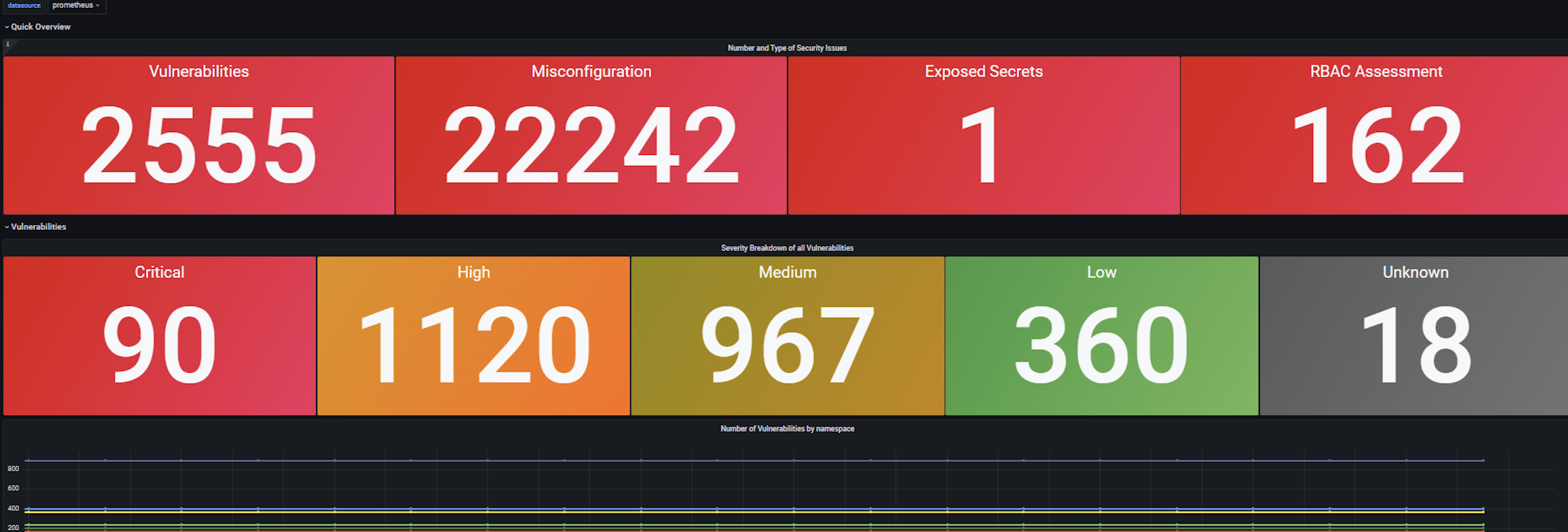
通过配置监控,可以方便的查看集群中的漏洞情况
3.4、自动化诊断工具 k8sgpt-operator
k8sgpt-operator可以自动化检测集群和多集群的状况,并给出满意的解决方案;
配置k8sgpt-operator很容易,我们只需要安装k8sgpt-operator到集群中,然后配置k8sgpt对象即可;
k8sgpt-operator提供了两个CRD,K8sGPT用来配置扫描工具的信息,Result展示扫描的集群问题;
1
2
| k8sgpts core.k8sgpt.ai/v1alpha1 true K8sGPT
results core.k8sgpt.ai/v1alpha1 true Result
|
3.4.1、配置k8sgpt对象
创建用于大模型的key
1
| kubectl create secret generic k8sgpt-sample-secret --from-literal=openai-api-key=$OPENAI_TOKEN -n k8sgpt-operator-system
|
创建对象
 1
 2
 3
 4
 5
 6
 7
 8
 9
10
11
12
13
14
15
16
17
18
19
20
21
22
23
24
25
26
27
28
29
30
31
32
33
34
35
| apiVersion: core.k8sgpt.ai/v1alpha1
kind: K8sGPT
metadata:
name: k8sgpt-sample
namespace: k8sgpt-operator-system
spec:
ai:
baseUrl: https://api.xxx.net/v1 # 配置api地址
enabled: true
model: gpt-3.5-turbo # 指定使用的模型
backend: openai
secret:
name: k8sgpt-sample-secret
key: openai-api-key # 指定上面创建的key
noCache: false
repository: ghcr.io/k8sgpt-ai/k8sgpt
version: v0.3.8
filters: # 过滤需要扫描的对象
- Pod
- Deployment
#integrations:
# trivy:
# enabled: true
# namespace: trivy-system
# filters:
# - Ingress
# sink:
# type: slack
# webhook: <webhook-url> # use the sink secret if you want to keep your webhook url private
# secret:
# name: slack-webhook
# key: url
#extraOptions:
# backstage:
# enabled: true
|
创建完对象之后,会自动分析k8s集群中有问题的资源
3.4.2、分析结果
查看所有结果
1
2
3
4
5
6
7
| [root@master operator]# kubectl get results -A
NAMESPACE NAME KIND BACKEND
k8sgpt-operator-system autocaraquatestaquadatasupportmetrics Service openai
k8sgpt-operator-system autocarbaicguardtestiautoguardadmin Deployment openai
k8sgpt-operator-system autocarbaicguardtestiautoguardsentrysync745bd5c54bb6sf7 Pod openai
k8sgpt-operator-system testtest StatefulSet openai
......
|
查看单个问题和修复建议
 1
 2
 3
 4
 5
 6
 7
 8
 9
10
11
12
13
14
15
16
17
18
19
20
21
22
23
24
25
26
27
28
29
30
31
32
| [root@master operator]# kubectl get results -n k8sgpt-operator-system testtest -o yaml
apiVersion: core.k8sgpt.ai/v1alpha1
kind: Result
metadata:
creationTimestamp: "2024-06-12T02:43:40Z"
generation: 1
labels:
k8sgpts.k8sgpt.ai/backend: openai
k8sgpts.k8sgpt.ai/name: k8sgpt-sample
k8sgpts.k8sgpt.ai/namespace: k8sgpt-operator-system
name: testtest
namespace: k8sgpt-operator-system
resourceVersion: "283934122"
selfLink: /apis/core.k8sgpt.ai/v1alpha1/namespaces/k8sgpt-operator-system/results/testtest
uid: eabb3c2f-ffb2-4957-8be5-188215a5799c
spec:
backend: openai
details: "Error: StatefulSet is referencing a non-existent service.\nSolution: \n1.
Check if the service name mentioned in the error message is correct.\n2. Create
a new service with the correct name if it does not exist.\n3. Update the StatefulSet
configuration to use the newly created service."
error:
- sensitive:
- masked: Oms4LQ==
unmasked: test
- {}
text: StatefulSet uses the service test/ which does not exist.
kind: StatefulSet
name: test/test
parentObject: ""
status:
lifecycle: historical
|
3.4.3、可视化分析结果,与告警联动
k8sgpt-operator原生支持与Prometheus集成,配置servicemonitor
 1
 2
 3
 4
 5
 6
 7
 8
 9
10
11
12
13
14
15
16
17
18
19
20
21
22
23
24
| apiVersion: monitoring.coreos.com/v1
kind: ServiceMonitor
metadata:
name: k8sgpt-operator
namespace: k8sgpt-operator-system
spec:
endpoints:
- bearerTokenFile: /var/run/secrets/kubernetes.io/serviceaccount/token
interval: 30s
port: https
scheme: https
tlsConfig:
insecureSkipVerify: true
selector:
matchLabels:
app.kubernetes.io/component: kube-rbac-proxy
app.kubernetes.io/created-by: k8sgpt-operator
app.kubernetes.io/instance: release
app.kubernetes.io/managed-by: Helm
app.kubernetes.io/name: k8sgpt-operator
app.kubernetes.io/part-of: k8sgpt-operator
app.kubernetes.io/version: 0.0.26
control-plane: controller-manager
helm.sh/chart: k8sgpt-operator-0.1.6
|
导入grafana视图配置
下载,k8sgpt-overview.json
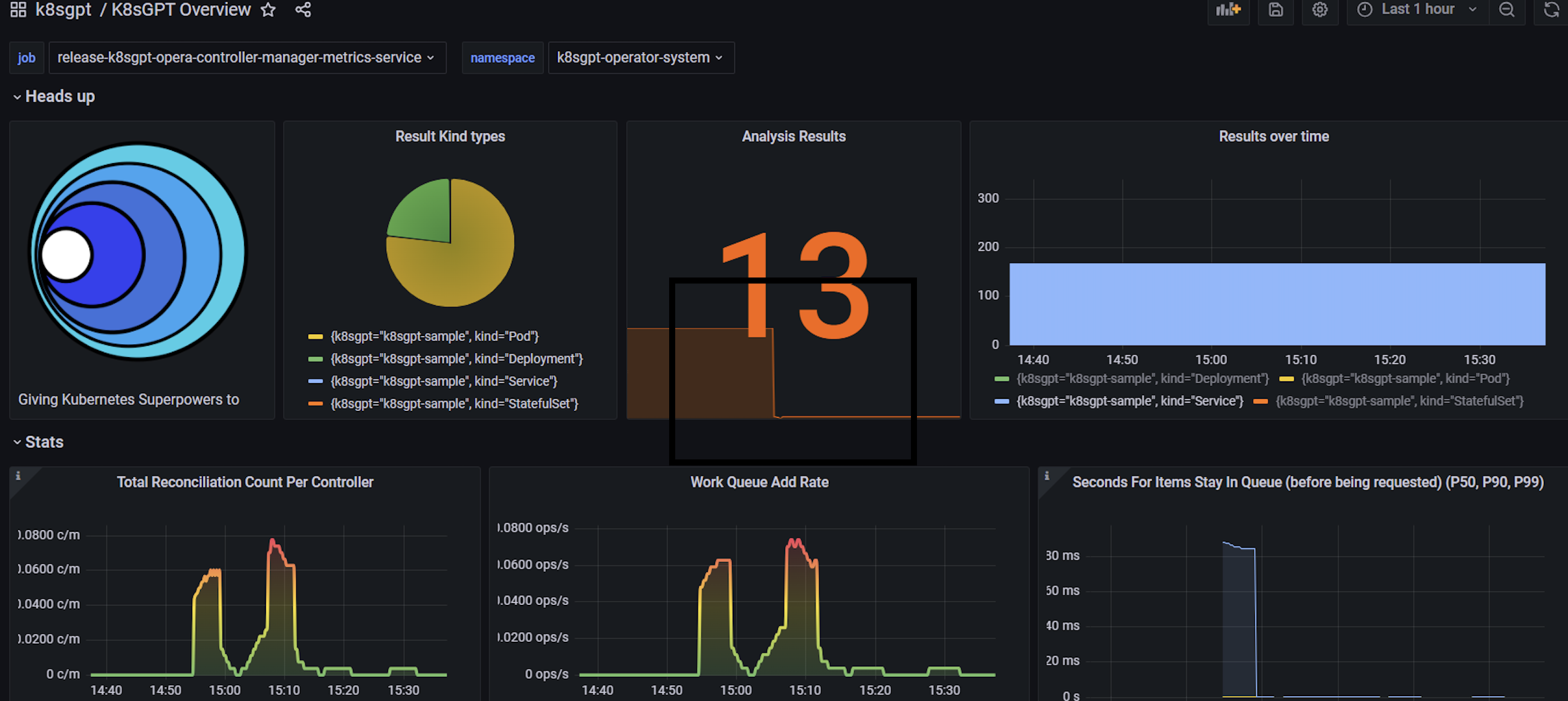
视图中可以清晰的看到集群中存在问题的对象数量,以及大模型分析的结果数,通过配置相关告警规则,可以将集群中出现的问题推送到自定义的告警平台中;
四、总结
通过将K8sGPT集成到我们的Kubernetes集群中,我们建立了一个高效的自然语言处理平台,为文本生成、智能对话等任务提供了强大的支持。在当前的集群中,K8sGPT已经展现出诸多优势:通过示例,我们能够更便捷地发现集群中的问题,并快速提供解决方案,从而提高了故障排除的效率,降低了集群维护的难度。
展望未来,我们对K8sGPT在Kubernetes集群中的应用充满了期待。我们希望通过进一步集成和探索K8sGPT,实现更加智能化的自动化运维。我们的目标是让K8sGPT不仅仅是一个问题诊断工具,而是一个能够主动预测问题、自动修复故障的智能运维助手。这将大大减少运维人员的主动介入,提升集群的稳定性和可靠性。
此外,我们计划将K8sGPT的应用扩展到多云环境和混合云架构中。无论是公有云、私有云还是边缘计算环境,K8sGPT都将能够提供一致的支持和服务,帮助我们实现更灵活和高效的云端管理。通过这些努力,我们相信K8sGPT将在未来发挥更大的作用,助力我们的集群管理和运维达到新的高度。